A little band,
a lot of pedals.
QUARTET is custom firmware that turns the FM-1 into four players (a lead, pads, a bass and drums), each with its own board of four effects pedals. Make a beat, play and record parts over it, stomp on fuzz or spring reverb while it plays, chain patterns into songs, and bridge live from one song into the next.
Quick startFull guidePlay it in your browser- 4 players
- 10 patterns each
- 10 songs
- 84 sounds
- 26 drum kits
- 40 pedals
- 12 saves
- 4 looks
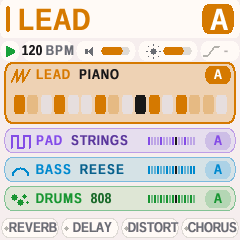
Home: the four players, the chosen one open, its pedals along the bottom.
Every control
Three rules: SELECT always picks the player, KNOB 1–4 set what the screen shows left to right, and tap switches while hold opens. HOME gets you back from anywhere.
Everyday
| PLAY | Start (from step one) and stop. |
| MASTER | Volume. |
| SELECT | Pick the player the keys play. |
| ALGORITHM | Its sound (drums: the kit), group after group. In other pages it chooses on that page. |
| PRESETS | Its pattern, A–J. While playing, it switches at the end of the current one. |
| OCT- OCT+ | Tap: the keys' octave (lit one down or up, blinking at two). Hold: move the pattern an octave. |
| HOME | Home, from anywhere. |
The home screen's knobs
| KNOB 1 | Tempo. |
| KNOB 2 | The chosen player's mix level. |
| KNOB 3 | Its brightness (drums: the kit's decay). |
| KNOB 4 | Pedal fade: pedals switch at once, or fade in and out over 1–4 bars. |
The line under the title shows all four.
Pedals
| FX SEL ENV LFO | The chosen player's four pedals. Tap: on or off (lit when on). Hold: open it. |
| On a pedal | KNOB 1 on/off, KNOB 2–4 its knobs, ALGORITHM another pedal, PRESETS another kind. |
| EDIT ×3 | The whole pedalboard at once. |
Making a beat (SEQ)
| SEQ | The step recorder for the chosen player. |
| Drums | A black key picks the drum, white keys switch its hits. |
| Lead, pad, bass | ALGORITHM moves the cursor; play a key to write a note (hold several for a chord). |
| Knobs | Bars, note length, expression, note. |
| EDIT | Switch the knobs to STEP FX: chance, ratchet, nudge, note in key. |
| ARP | Tap: tie the note on. Hold: a rest. |
Recording
| REC | From home: record into the chosen player. A bar's count-in first (if playing: the bar after the next bar line). Tap again to stop. |
| ARP | On the LIVE page: undo the last take. |
| Hold REC | The RECORD page: clear the pattern or everything (REC twice). |
A first take into an empty pattern sets its length. A MIDI keyboard records too, with its velocity.
Songs
| SEQ ×2 | SUPER SEQ: line patterns up box by box, a row per player. Ten songs. |
| SEQ held | In the step recorder: the copy page. |
| ARP + PRESETS | Copy the pattern into the next letter. |
Sounds (EDIT)
| EDIT | The instrument: type, group, sound. |
| EDIT ×2 | The sound editor: MAIN, OSC, AMP, FILT, PITCH, NOISE, KEYS, LFO, each with a chart (drums: a page per drum). |
| REC twice | Save the sound to a USER slot. |
Mix, key and feel (GLO)
| GLO | The mixer: four volumes; the pedal buttons mute. |
| GLO ×2 | SONG: the key, scale lock, key lights, swing, time signature. |
| GLO ×3 | BRIDGE: how a bridge between saves goes. |
| Hold GLO | Beat repeat; the first five white keys pick 1/2 to 1/32. |
| ARP | Arpeggiator. Tap: on/off. Hold: rate, octaves, direction. |
Saving and bridging (SAVE)
| SAVE | Twelve slots. PRESETS picks one, KNOB 1–4 each player's starting pattern. |
| REC twice | Save. PLAY twice: load. |
| SELECT | Bridge on. Then, while playing, PLAY bridges into the chosen save on the beat (again: cancel). |
Your work also saves itself when the music stops.
Shortcuts
| HOME + PRESETS | The look: Paper, Dark, Neon, LCD. |
| HOME + ALGORITHM | The MIDI channel (or OMNI). |
| REC twice | Confirms anything that keeps or replaces work. |
| OCT- at power-on | USB rescue mode, if something goes wrong. |
Put it on your FM-1
Try it in your browser first if you like: it's the real firmware.